x <- rnorm(10) # data from normal distribution

# data
x
#>  [1] -1.3212882  0.7246339 -1.0663206 -0.9561050 -0.3952596  0.8037211
#>  [7] -0.7839550 -1.5499343  0.5683434  1.5421302

# the model is a normal distribution with mu = 0 and sd = 1
dnorm(x, 0, 1)
#>  [1] 0.1666533 0.3068226 0.2259462 0.2525851 0.3689650 0.2888284 0.2933962
#>  [8] 0.1200212 0.3394442 0.1214781

# log likelihood
sum(log(dnorm(x, 0, 1)))
#> [1] -14.61055Inference
Psychological Sciences
Filippo Gambarota
University of Padova
Last modified: 08-12-2025
Likelihood and Deviance
Likelihood
The likelihood is the joint probability of the observed data viewed as a function of the parameters.
\[ \begin{aligned} \ell(\boldsymbol{\theta} \mid \mathbf{y}) &= \log \mathcal{L}(\boldsymbol{\theta} \mid \mathbf{y}) \\ &= \log \prod_{i=1}^n f(y_i \mid \boldsymbol{\theta}) \\ &= \sum_{i=1}^n \log f(y_i \mid \boldsymbol{\theta}) \end{aligned} \]
Likelihood, in R
Likelihood
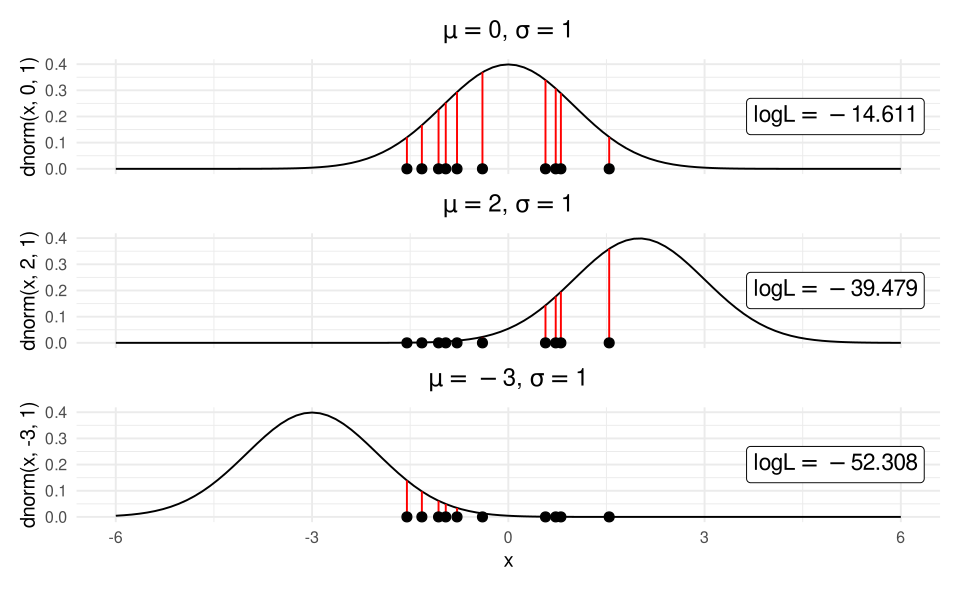
By summing the logarithm all the red segments we obtain the log likelihood of the model given the observed data.
Likelihood
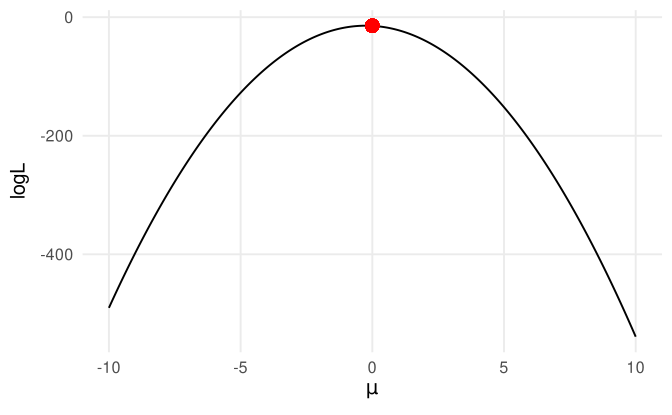
In the previous slide we tried only 3 values for the mean. Let’s image to calculate the log likelihood for several different means. The parameter with that is associated with highest likelihood is called the maximum likelihood estimator. In fact, the \(\mu = 0\) is associated with the highest likelihood.
Deviance
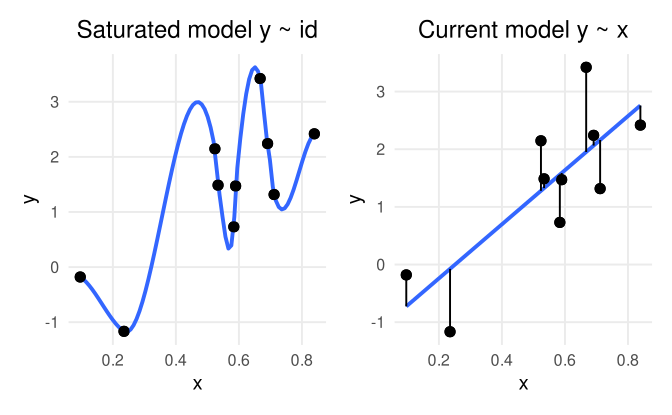
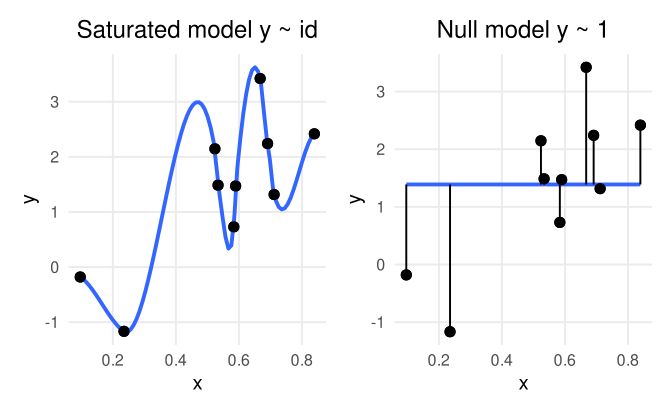
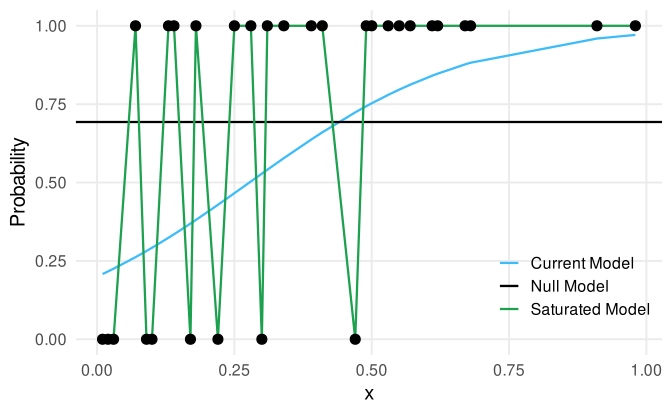
The (residual) deviance in the context of GLM can be considered as the distance between the current model and a perfect model (often called saturated model).
\[ D_{res} = -2[\log(\mathcal{L}_{current}) - (\log\mathcal{L}_{sat})] \]
Where \(\mathcal{L}\) is the likelihood of the considered model (see the previous slides). Clearly, the lower the deviance, the closer the current model to the perfect model suggesting a good fit.
Deviance - Saturated model
The saturated model is a model where each observation \(x_i\) has a parameter.
Deviance - Null model
Another important quantity is the null deviance that is expressed as the distance between the null model and the saturated model.
\[ D_{null} = -2[\log(\mathcal{L}_{null}) - (\log\mathcal{L}_{sat})] \]
The null deviance can be interpreted as the maximal deviance because is estimated using a model without predictors. A good model will have a residual deviance lower than the null model.
Deviance - Null model
Inference
Wald tests
The basic approach when doing inference with GLM is interpreting the Wald test of each model coefficient. The Wald test is calculated as follows:
\[ z = \frac{\beta_{p'} - \beta_0}{\sigma_{\beta_{p'}}} \]
Where \(\beta_{p'}\) is the regression coefficients, \(\beta^0\) is the value under the null hypothesis (generally 0) and \(\sigma_{\beta_{p'}}\) is the standard error. P-values and confidence intervals can be calculated based on a standard normal distribution.
Wald-type confidence intervals
Wald-type confidence interval (directly from model summary), where \(\Phi\) is the cumulative Gaussian function qnorm():
\[ 95\%CI = \hat \beta \pm \Phi(\alpha/2) SE_{\beta} \]
Wald tests and confidence intervals
#>                   Estimate  Std. Error   z value     Pr(>|z|)
#> (Intercept)     -4.3239056 0.690689421 -6.260275 3.842994e-10
#> Parental_stress 0.0360147 0.009837796 3.660850 2.513801e-04#> [1] -5.677632 -2.970179#> [1] 0.01673297 0.05529642# directly
confint.default(fit_teddy)#> 2.5 % 97.5 %
#> (Intercept) -5.67763203 -2.97017925
#> Parental_stress 0.01673297 0.05529642Profile likelihood confidence intervals
The computation is a little bit different and they are not always symmetric:
# profile likelihood, different from wald type
confint(fit_teddy)
#> 2.5 % 97.5 %
#> (Intercept) -5.71540068 -2.99151990
#> Parental_stress 0.01666084 0.05553703Confidence intervals
When calculating confidence intervals it is important to consider the link function. In the same way as we compute the inverse logit function on the parameter value, we could revert also the confidence intervals. IMPORTANT, do not apply the inverse logit on the standard error and then compute the confidence interval.
#>        b    lower    upper
#> 1.036671 1.016473 1.057270#> b lower upper
#> 1.0366711 -0.9831016 3.0564438Confidence intervals1
#>        b    lower    upper
#> 1.036671 1.016473 1.057270#> b lower upper
#> 1.0366711 -0.9831016 3.0564438Confidence intervals
The same principle holds for predicted probabilities. First compute the intervals on the logit scale and then transform-back on the probability scale:
dd <- data.frame(Parental_stress = 50:60)
pp <- data.frame(predict(fit_teddy, data.frame(Parental_stress = 50:60), se.fit = TRUE))
pp <- cbind(dd, pp)

pp$lower_ci <- plogis(pp$fit - 2*pp$se.fit)
pp$upper_ci <- plogis(pp$fit + 2*pp$se.fit)

pp
#> # A tibble: 11 × 6
#> Parental_stress fit se.fit residual.scale lower_ci upper_ci
#> <int> <dbl> <dbl> <dbl> <dbl> <dbl>
#> 1 50 -2.52 0.240 1 0.0472 0.115
#> 2 51 -2.49 0.233 1 0.0496 0.117
#> 3 52 -2.45 0.226 1 0.0520 0.119
#> 4 53 -2.42 0.219 1 0.0545 0.122
#> 5 54 -2.38 0.213 1 0.0571 0.124
#> 6 55 -2.34 0.206 1 0.0598 0.127
#> 7 56 -2.31 0.200 1 0.0625 0.129
#> 8 57 -2.27 0.194 1 0.0654 0.132
#> 9 58 -2.24 0.189 1 0.0683 0.135
#> 10 59 -2.20 0.184 1 0.0713 0.138
#> 11 60 -2.16 0.179 1 0.0744 0.141Anova
With multiple predictors, especially with categorical variables with more than 2 levels, we can compute the an anova-like analysis individuating the effect of each predictor. In R we can do this using the car::Anova() function. Let’s add more predictors with the teddy dataset. This is the maximal models with all predictors and interactions.
#>
#> Call:
#> glm(formula = Depression_pp01 ~ Education + Parental_stress +
#>     Education:Parental_stress, family = binomial(link = "logit"),
#>     data = teddy)
#>
#> Coefficients:
#>                                        Estimate Std. Error z value Pr(>|z|)
#> (Intercept)                            -5.29322    1.12535  -4.704 2.56e-06 ***
#> EducationHigh school                    1.51796    1.48932   1.019  0.30810
#> EducationMiddle school                  1.46690    2.73684   0.536  0.59197
#> Parental_stress                         0.05037    0.01571   3.207  0.00134 **
#> EducationHigh school:Parental_stress   -0.02163    0.02119  -1.020  0.30751
#> EducationMiddle school:Parental_stress -0.03094    0.03751  -0.825  0.40946
#> ---
#> Signif. codes:  0 '***' 0.001 '**' 0.01 '*' 0.05 '.' 0.1 ' ' 1
#>
#> (Dispersion parameter for binomial family taken to be 1)
#>
#>     Null deviance: 284.13  on 378  degrees of freedom
#> Residual deviance: 268.75  on 373  degrees of freedom
#> AIC: 280.75
#>
#> Number of Fisher Scoring iterations: 5
Anova
plot(allEffects(fit_anova))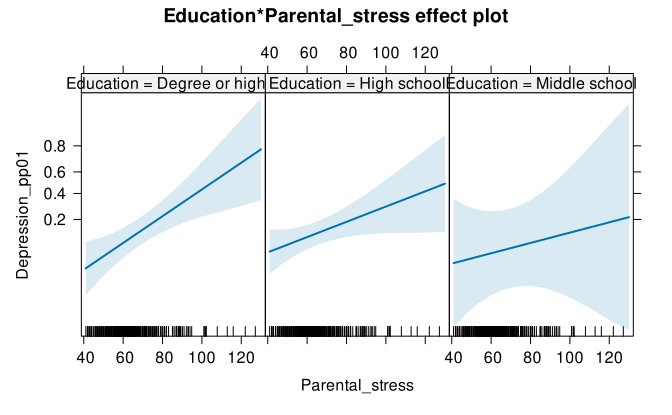
Anova
Then using car::Anova(). For each effect we have the \(\chi^2\) statistics and the associated p-value. The null hypothesis is that the specific factor did not contribute in reducing the residual deviance.
car::Anova(fit_anova)#> # A tibble: 3 × 3
#> `LR Chisq` Df `Pr(>Chisq)`
#> <dbl> <dbl> <dbl>
#> 1 1.12 2 0.571
#> 2 13.3 1 0.000272
#> 3 1.37 2 0.505Deviance - Likelihood Ratio Test
When we perform a likelihood ratio test (see previous slides) we are essentially comparing the residual deviance (or the likelihood) of two models.
Deviance - Likelihood Ratio Test
With the null model clearly the residual deviance is the same as the null deviance because we are not using predictors to reduce the deviance.
summary(fit_null)#>
#> Call:
#> glm(formula = y ~ 1, family = binomial(link = "logit"), data = dat)
#>
#> Coefficients:
#> Estimate Std. Error z value Pr(>|z|)
#> (Intercept) -0.9445 0.3150 -2.999 0.00271 **
#> ---
#> Signif. codes: 0 '***' 0.001 '**' 0.01 '*' 0.05 '.' 0.1 ' ' 1
#>
#> (Dispersion parameter for binomial family taken to be 1)
#>
#> Null deviance: 59.295 on 49 degrees of freedom
#> Residual deviance: 59.295 on 49 degrees of freedom
#> AIC: 61.295
#>
#> Number of Fisher Scoring iterations: 4Deviance - Likelihood Ratio Test
If the predictor x is useful in explaining y the residual deviance will be reduced compared to the null (overall deviance).
summary(fit_current)#>
#> Call:
#> glm(formula = y ~ x, family = binomial(link = "logit"), data = dat)
#>
#> Coefficients:
#> Estimate Std. Error z value Pr(>|z|)
#> (Intercept) -6.362 1.769 -3.597 0.000322 ***
#> x 9.942 2.884 3.448 0.000565 ***
#> ---
#> Signif. codes: 0 '***' 0.001 '**' 0.01 '*' 0.05 '.' 0.1 ' ' 1
#>
#> (Dispersion parameter for binomial family taken to be 1)
#>
#> Null deviance: 59.295 on 49 degrees of freedom
#> Residual deviance: 31.601 on 48 degrees of freedom
#> AIC: 35.601
#>
#> Number of Fisher Scoring iterations: 6Deviance - Likelihood Ratio Test
Comparing the two models we can understand if the deviance reduction can be considered statistically significant.
anova(fit_null, fit_current, test = "LRT")#> # A tibble: 2 × 5
#> `Resid. Df` `Resid. Dev` Df Deviance `Pr(>Chi)`
#> <dbl> <dbl> <dbl> <dbl> <dbl>
#> 1 49 59.3 NA NA NA
#> 2 48 31.6 1 27.7 0.000000142Notice that the difference between the two residual deviances is the test statistics that is distributed as a \(\chi^2\) with \(df = 1\).
Deviance - Likelihood Ratio Test

Deviance1
Deviance - Example
Let’s fit the three models:
Deviance - Example
We can calculate the residual deviance:
We can calculate the null deviance:
Model comparison
The table obtained with car::Anova() is essentially a model comparison using the Likelihood Ratio Test. This can be done using the anova(...) function.
\[ \begin{align*} D = 2 (log(\mathcal{L}_{full}) - log(\mathcal{L}_{reduced})) \\ D \sim \chi^2_{df_{full} - df_{reduced}} \end{align*} \]
Model comparison
To better understanding, the Education effect reported in the car::Anova() table is a model comparison between a model with y ~ Education + Parental_stress and a model without Education. The difference between these two model is the unique contribution of Education after controlling for Parental_stress:
#> # A tibble: 2 × 5
#>   `Resid. Df` `Resid. Dev`    Df Deviance `Pr(>Chi)`
#>         <dbl>        <dbl> <dbl>    <dbl>      <dbl>
#> 1         376         283.    NA     NA    NA
#> 2 375 270. 1 13.3 0.000272car::Anova(fit)#> # A tibble: 2 × 3
#> `LR Chisq` Df `Pr(>Chisq)`
#> <dbl> <dbl> <dbl>
#> 1 1.12 2 0.571
#> 2 13.3 1 0.000272Model comparison
The model comparison using anova() (i.e., likelihood ratio tests) is limited to nested models thus models that differs only for one term. For example:
fit1 and fit2 are non-nested because we have the same number of predictors (thus degrees of freedom). fit3 and fit1/fit2 are nested because fit3 is more complex and removing one term we can obtain the less complex models.
Model comparison
anova(fit1, fit2, test = "LRT") # do not works properly#> # A tibble: 2 × 5
#> `Resid. Df` `Resid. Dev` Df Deviance `Pr(>Chi)`
#> <dbl> <dbl> <dbl> <dbl> <dbl>
#> 1 376 283. NA NA NA
#> 2 377 271. -1 12.1 NAanova(fit1, fit3, test = "LRT") # same anova(fit2, fit3)#> # A tibble: 2 × 5
#> `Resid. Df` `Resid. Dev` Df Deviance `Pr(>Chi)`
#> <dbl> <dbl> <dbl> <dbl> <dbl>
#> 1 376 283. NA NA NA
#> 2 375 270. 1 13.3 0.000272Information Criteria
As for standard linear models I can use the Akaike Information Criteria (AIC) or the Bayesian Information Criteria (BIC) to compare non-nested models. The downside is not having a properly hypothesis testing setup.
data.frame(BIC(fit1, fit2, fit3)) |>
    arrange(BIC)
#> # A tibble: 3 × 2
#> df BIC
#> <dbl> <dbl>
#> 1 2 283.
#> 2 4 294.
#> 3 3 301.data.frame(AIC(fit1, fit2, fit3)) |>
arrange(AIC)#> # A tibble: 3 × 2
#> df AIC
#> <dbl> <dbl>
#> 1 2 275.
#> 2 4 278.
#> 3 3 289.Plotting effects
R packages
Everything can be simplified using some packages to perform each step and returning a plot:
-
allEffects()from theeffects()package (return a base R plot) -
ggeffect()from theggeffect()package (return aggplot2object) -
plot_modelfrom thesjPlotpackage (similar toggeffect())
Quick plots with allEffects()
effects::allEffects() provides quick but not very beautiful plots. They are also not very easy to customize, especially if you are familiar with ggplot2:
plot(allEffects(fit_anova))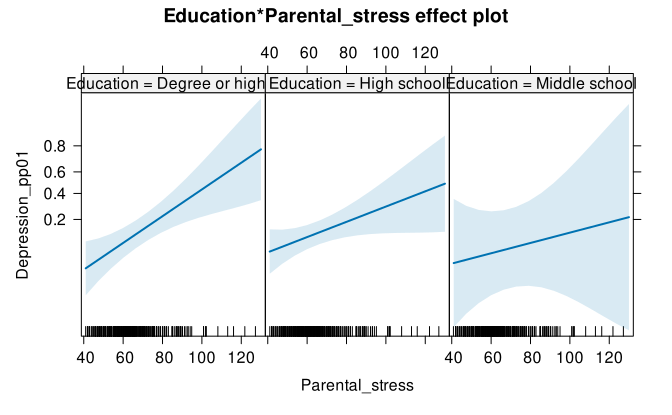
Quick plots with ggeffect()
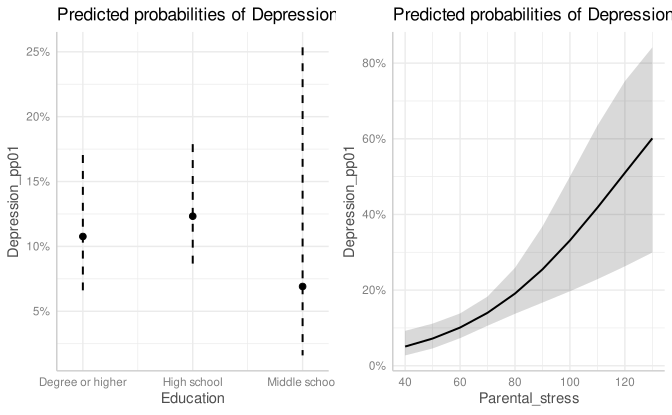
ggeffect::ggeffect() provides the same quick functionalities of effects (in fact uses effects) but it returns a ggplot2 object.
Coefficients plots with sjplot::plot_model()
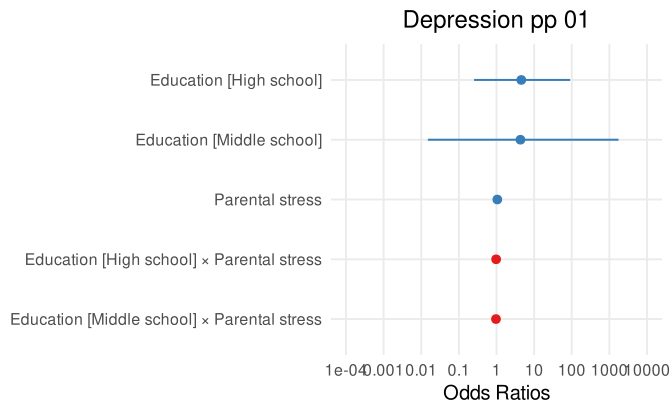
sjPlot::plot_model(fit_anova)